Adding article-level metadata to BHL

Recently I've been thinking about the best ways to make article-level metadata from BioStor more widely available. For example, for someone visiting the BHL site there is no easy way to find articles, which are the basic unit for much of the scientific literature. How hard would it be to add articles to BHL? In the past I've wanted an all-singing all dancing article-level interface to BHL content (sort of BioStor on steroids), but that's a way off, and ideally would have a broader scope than BHL. So instead I've been thinking of ways to add articles to BHL without requiring a lot of re-engineering of BHL itself.

Looking at other digital archive projects like Gallica and Google Books it strikes me that if the BHL interface to a scanned item had a "Contents" drop down menu then users would be able to go to individual articles very easily. Below is a screen shot of how Gallica does this (see http://gallica.bnf.fr/ark:/12148/bpt6k61331684/f57).

Gallica

There's also a screen shot of something similar in Google Books (see http://books.google.co.uk/books?id=PkvoRnAM6WUC)
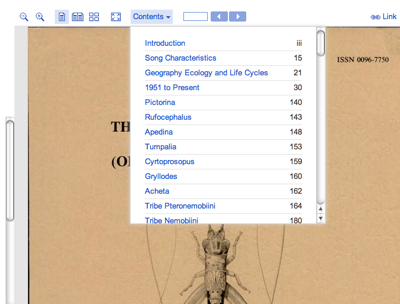
Contents

The idea would be that if BioStor had found articles within a scanned item, they would be listed in the contents menu (title, author, starting page), and if the user clicked on the article title then the BHL viewer would jump to that page. If there were no known articles, but the scanned item had a table of contents flagged (e.g., http://www.biodiversitylibrary.org/item/25703) then the menu could function as a button that takes you to that page. If there are no articles or contents, then the menu could be grayed out, or simply not displayed. This way the interface would work for books, monographs, and journal volumes.

Now, admittedly this is not the most elegant interface, and it treats articles as fragments of books rather than individual units, but it would be a start. It would also require minimal effort both on the part of BHL (who need to add the contents button), and myself (it would be easy to create a dump of the article titles indexed by scanned item).

Biodiversity Heritage Library, Google books, and metadata quality

I've been playing recently with the Biodiversity Heritage Library (BHL), and am starting to get a sense for the complexities (and limitations) of the metadata BHL stores about publications. The more I look at BHL the more I think the resource is (a) wonderfully useful and (b) hampered by some dodgy metadata.

The BHL data model has three kinds of entities, "Titles", "Items", and "Pages". Pages are individual pages in an item, where an item which corresponds to a physical object that has been scanned (such as a book or a bound volume of a journal). A title may comprise a single item, such as book, or many items, such as volumes of a journal. Most of the metadata BHL has relates to physical items (books and bound volume issues), as opposed to article-level metadata, which is basically absent (see But where are the articles?).

bhl_model.png


This model reflects the sources of the BHL metadata (library catalogues) and the mode of operation (bulk scanning of bound volumes). But it can make working out dates of somewhat challenging.

To give an example, I did a search on the frog name Hyla rivularis Taylor, 1952 (NameBankID 27357), currently known as Isthmohyla rivularis. I wanted to find the original description of this frog. A BHL search returns 34 pages containing the name Hyla rivularis, distributed over 5 titles (a title in BHL may be a book, or a journal). Given that the name was published in 1952, it would be nice if I could sort these results by date, and then look at items from 1952. Unfortunately I can't. BHL has limited information on dates, especially at the level I would need to find a document published in 1952.

For the five titles returned in the search, I have dates for four of them, albeit two are ranges (University of Kansas publications, Museum of Natural History, 1946-1971, and The University of Kansas science bulletin, 1902-1996). At the level of individual items, only item 25858 (University of Kansas publications, Museum of Natural History) has dates (1961-1966). If I look at the VolumeInfo field for an item (you can get this from the database dump, or using the JSON web service) I sometimes get strings like this "v.35:pt.1 (1952)". This item (25857) is the one I'm after, but the date is buried in the VolumeInfo string. So, the information I need is there, but it's going to need some parsing.

84203b53fc75bd5bbc7f6a62fe8500f1.jpeg

Another issue is that of duplicates. Searching for publications on Rana grahamii, I found items 41040 and 45847. Although one item is treated as a book, and the other as a volume of the journal Records of the Indian Museum, these are the same thing. Having duplicates is a complication, but it might also be useful for quality control and testing (for example, do taxon name extraction algorithms return the same names from OCR text from both copies?). Nor is having duplicate copies and/or identifiers unique to BHL. The Records of the Indian Museum has a series-level identifier (ISSN 0537-0744), and this article ("A monograph of the South Asian, Papuan, Melanesian and Australian frogs of the genus Rana") also as the ISBN 8121104327.

There are parallels with Google books scanning project, which has been the subject of criticism on several fronts, including the quality of the metadata they have for each book. Geoff Nunberg has an entertaining post entitled Google Books: A Metadata Train Wreck which lists many examples of errors. This blog post also contains a detailed response from Jon Orwant of Google books. In essence, Google books is riddled with metadata errors (such as books on the Internet with publication dates predating the birth of their authors), but most of these errors have come from library catalogues (not unexpected given the scale of the task), not Google.

What could BHL do about its metadata? One thing is crowdsourcing. BHL does a little of this already, for example capturing user-provided metadata when PDFs are created, but I wonder if we could do more. For example, imagine dumping metadata for all 39,000 items into a semantic wiki and inviting people to edit and annotate the metadata. This could be extended to adding article boundaries (i.e., identifying which page corresponds to the start of an article). There is also considerable scope for trying to find article boundaries using existing metadata from bibliographies assembled by individual scientists.

But we should watch closely what Google does with its book project. Eric Hellman has argued that, far from creating the metadata mess, Google is ideally positioned to sort it out. He writes:
What if Google, with pseudo-monopoly funding and the smartest engineers anywhere, manages to figure out new ways to separate the bird shit from the valuable metadata in thousands of metadata feeds, thereby revolutionizing the library world without even intending to do so?

Google Books and Mediawiki

Following on from the previous post, I wrote a simpe Mediawiki extension to insert a Google Book into a wiki page. Written in a few minutes, not tested much, etc.

To use this, copy the code below and save in a file googlebook.php in the extensions directory of your Mediawiki installation.


<?php
# rdmp

# Google Book extension
# Embed a Google Book into Mediawiki
#
# Usage:
# <googlebook id="OCLC:4208784" />
#
# To install it put this file in the extensions directory
# To activate the extension, include it from your LocalSettings.php
# with: require("extensions/googlebook.php");

$wgExtensionFunctions[] = "wfGoogleBook";

function wfGoogleBook() {
global $wgParser;
# registers the <googlebook> extension with the WikiText parser
$wgParser->setHook( "googlebook", "renderGoogleBook" );
}

# The callback function for converting the input text to HTML output
function renderGoogleBook( $input, $argv )
{
$width = 425;
$height = 400;

if (isset($argv["width"]))
{
$width = $argv["width"];
}
if (isset($argv["height"]))
{
$width = $argv["height"];
}

$output = '<script type="text/javascript"
src="http://books.google.com/books/previewlib.js">
</script>';
$output .= '<script type="text/javascript">
GBS_insertEmbeddedViewer(\''
. $argv["id"] . '\','. $width . ',' . $height . ');
</script>';

return $output;
}
?>


In your LocalSettings.php file add the line


require("extensions/googlebook.php");


Now you can add a Google book to a wiki page by adding a <googlebook> tag. For example:


<googlebook id="OCLC:4208784" />


The id gives the book identifier (such as an OCLC number or a ISBN (you need to include the identifier prefix). By defaulot, the book will appear in a box 425 × 400 pixels in size. You can add optional width and height parameters to adjust this.

OCLC and Google books

I've started to come across more taxonomic books in Google Books, such as Catalogue of the specimens of snakes in the collection of the British museum by John Edward Gray. Google books provides a nice widget for embedding views of books. There is tool for generating the Javascript code. Note that in Blogger (which I use to create this blog) you need to make sure that theJavascript occurs on a single line with no line breaks for it to work.


The Javascript used (with linebreaks that must be removed before using) is:

<script type="text/javascript"
src="http://books.google.com/books/previewlib.js">
</script>
<script type="text/javascript">
GBS_insertEmbeddedViewer('OCLC:4208784',425,400);
</script>


I stumbled across this book whilst searching for the original record for the snake Enhydris punctata. Confusingly, the Catalogue of Life lists this snake as Enhydris punctata GRAY 1849, implying that Gray's original name still stands, whereas in fact it should be Enhydris punctata (Gray, 1849) as the Gray's original name for the snake was Phytolopsis punctata. It's little things like this that drive me nuts, especially as the Catalogue of Life has no obvious, quick means of fixing this (Wiki, anyone?).

I was also interested in using the OCLC numbers a GUID for the book, but there are several to choose from (including two related to the Google Book). Unlike DOIs, a book may have multiple OCLCs (sigh). Still, it's a GUID, and it's resolvable, so it's a start. Hence, one could link GUIDs for the names published in this book to the book itself.
Powered by Blogger.